Git is awesome because:
- It is distributed.
When you work in git, the first thing you typically do is copy someone else's existing git repository with "git clone." This is opposed to interacting with the location of the central repository over the lifetime of your development. This is one big bullet point that infers many concrete benefits:
- Better collaboration: Whenever you do something in SVN, everybody knows about it. In Git, when you clone a repository, you are the project owner of your own local copy and its private until you want to make it public. It doesn't matter how many times people clone the central repository, you will never know the difference. This design has led to the great success of open-source projects. Communities of developers feel at ease in forking a repository and doing their own work without ever risking breaking the trunk code base.
- No noise in central: An extension to the previous point, in which project owners in SVN know who their collaborators are. To create a branch in SVN, you create a new directory in which you copy all the code to, and this directory lives on the central repository. In Git, you create branches on your own repository, a repository in which you own and is private. No more problems with developers leaving the company or forgetting to clean up their branches, leaving behind a mess in the SVN repository.
- Access control: Both repository systems allow you to control read and write permissions. But, developers who don't have write access in SVN, can't use version control at all. Developers using Git can keep their changes under version control in their own local repository for a later date when they have permission to publish.
- Work offline: Because you have your own copy of the repo, you can work offline and as a result can work well and fast with slow/no network access.
- Backups: Every time you clone the repo, you are creating a backup, in case the central repo fails for some reason.
- Flexible work flow: Git is extremely flexible. In Git, there is no "central" repository. Every Git repository is the same, and every repository can interact with each other in the same ways. Because of this loose coupling, there is a lot of flexibility in the collaboration of teams. An example here:
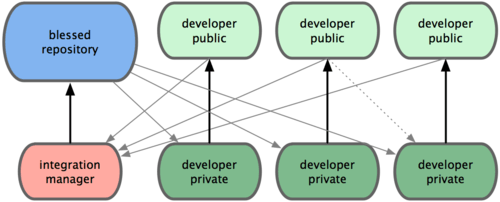
In this example the developers request the integration manager to pull each of their requests. The manager handles the merging, before pushing into the "central" repository. The integration manager interacts with the developer's repos the same way it interacts with the "central" repository.The point of all these being that you can manage any workflow independent of a central repository.
2. Branching is Easier
I haven't really seen this problem when I used SVN, but I have been told by others- that people don't like making branches in SVN to the point that they just don't do it. This is bad. Committing to trunk is bad. After writing this I talked with a colleague who told me about continuous integration. Though I have heard this term before, I didn't associate that as a opposing force to "committing to the trunk is bad." So I'm retracting this statement, and I will do a future post about continuous integration. There is still the point that developers should be able to create branches easily for experimentation or whatnot. With Git, creating, switching to and deleting branches is easy, so developers won't think twice about creating an experimental branch, or one to start developing a new feature on.
- People don't branch in SVN: There are few reasons why people don't like branching in SVN. One is you usually have to type in a long URL where the SVN repo is located... twice. Once for copying from and once for copying to. This operation takes a few seconds, as you are copying the entire branch over. When its all over, you have a directory on the SVN server that everybody can see with your name spelled wrong.
- Branching in Git at two levels:
- The first level of branching in Git people don't really realize, that is "git clone". Whenever you clone a repo, you are copying the code base from one place to another, effectively creating a branch off the original code base. In fact, the command is similar in speed of execution and annoying-ness as creating a branch in SVN. The difference is that you are required to clone, there is no other option. This forces the workflow of separating a developer's workspace from the trunk.
- The second level of branching is with the "git branch" command. To create a branch in git you do. "git branch <branch_name>". This is very fast and lightweight command. More so, switching branches is just as easy, just do: "git checkout <branch_name>". This additional second level of branching not present in SVN give developers flexibility to separate their features, bugs and experiments at their discretion. The added complexity is managed by them, not the central server, and pushing changes to the server is selective to only the branches of their choosing.
3. Faster and Smaller
I won't go too much into detail about this, and you can look into the specific implementations of Git and SVN to understand why Git is faster and smaller. But, its a good thing.
