Tuesday, November 5, 2013

Guice... What is it good fer?

Guice is a dependency injection framework written by Google, and it is used in many of Google's other software products. Guice can be closely compare to Spring; both are dependency injection frameworks, but Guice adds the benefit of type safety.

So why do you want to use Guice? Well let's start with what how you are currently writing code.

The Problem:
Currently you might be writing code that looks like this:

public class DataProcessor{

    public DataProcessor(){}

    public void processData(D data)
    {
        //Do something with data

        // Save data
        DbWriter myDbWriter = new DbWriter();
        myDbWriter.write(data);
    }
}


The problem with this code is that your DataProcessor class is tightly coupled with the class DBWriter. When you try to test this class, you will find that you cannot write a test on processData without relying on the DBWriter implementation.

Dependency Injection:
To solve the problem, we will "inject" the dependency into the constructor.

public class DataProcessor{
    private DbWriter myDbWriter;

    public DataProcessor(DBWriter dbWriter){
        myDbWriter = dbWriter;
    }

    public void processData(D data)
    {
        //Do something with data

        // Save data
        myDbWriter.write(data);
    }
}


Using dependency injection allows us to resolve this dependency at run-time. Now we can mock out the DBWriter class with our own stubbed implementation in our tests. This is an example of what our test class might look like:

public class DataProcessorTest{
    private DataProcessor classUnderTest;

    @Test
    public void testProcessData()
    {
        mockDbWriter = new DbWriterStub();
        classUnderTest = new DataProcessor(mockDbWriter);
        classUnderTest.processData();
        // Check mock to make sure we saved the data
    }
}


Our tests no longer relies on our DbWriter class. If DbWriter changes, this test will not fail. There are few libraries out there to easily create mocks. EasyMock is my favorite.

Guice:
So if you are thinking ahead you might realize that strictly implementing dependency injection introduces a cascading problem. If we are passing in every dependency into every class, where do we instantiate all the objects? Short answer: main().2

public static void main(String [] args){
    Application myApplication = new Application(new A(new B(...)));
    myApplication.start();
}


Believe it or not, I think this situation is ideal. You have a separation of concerns with the object creation and program execution1. All of the classes can be tested independently, and are more easily reused.

Instead of specifying every dependency in main, we can specify the dependencies using Guice modules:

import com.google.inject.AbstractModule;

public class MyGuiceModule extends AbstractModule{
    protected void configure() {
        bind(Applicaiton.class).to(MyApplication.class);
        bind(A.class).to(AImpl.class);
        bind(B.class).to(BImpl.class);
    }
}


Extra boilerplate is required for Guice. Activate your module from main like so:

public static void main(String [] args){
    Injector injector = Guice.createInjector(new MyGuiceModule());
    Application myApplication = 

        injector.getInstance(myApplication.class);
    myApplication.start();
}

And you have to specify that you want your classes to be injected by using the @Inject annotation on your constructor.

@Inject 
public DataProcessor(DBWriter dbWriter){
    myDbWriter = dbWriter;
}


Using the Guice modules puts all of your object creation into independent, reusable modules. Want to change an implementation for a database interface? Simply swap out the old implementation for the new one in the Guice module. The rest of your code will not break, and all you have left to do is add tests for your new database implementation. In order to use Guice, you are forced to structure your classes so that they are independent from each other. You will be less vulnerable to changes in your system.

I only gave one use-case for Guice. There are many other built in features including method and field injection, defining scopes (singletons), etc- which you can read about on their website.

For android developers out there I recommend a different dependency injection framework by Square called Dagger. It has less features than Guice, but it uses a annotation processor to build the object graph at compile time, instead of using reflection at run-time. This decreases the run-time overhead on the already stressed hardware of smartphones.

1 Robert Martin's Clean Code
2 You can also use factories, but that's a lot of boilerplate to do that for every dependency.

Thursday, September 26, 2013

Java: Pass by Value

Alright alright alright. So, here is the earth. (Round)

For those of you mingling in multiple languages it is hard to keep it all straight. Are parameters passed into functions pass-by-value? or pass-by-reference?

Let's get straight to the point. We are talking about Java here, and Java is pass by value. But I think that people are confused about what pass by value in java really means.

Let's look at an example.

public void passByValue(MyObject oParam){
    oParam.myAttribute = 10;
}


called by:

public static void main(String [] args)
{
    MyObject oMain = new MyObject();
    oMain.myAttribute = 5;
    passByValue(oMain);
    system.out.print(oMain.myAttribute)
}


What is the result of the system.out.print line above? If its pass by value the value should be 5, right? WRONG. 

Even though Java is pass by value, this common misconception gets a lot of people. Java passes object references by value, not the objects themselves. What do I mean by that? Well let's look at how a reference works conceptually.

This is what we get when we do "MyObject oMain = new MyObject();"


Now, when we pass in "oMain" as a parameter to the function "passByValue", the value of the reference is copied to the new parameter "oParam":


Now you can see that any modifications to the "oParam" reference, is acting on the same object that the "oMain" reference is pointing to. 

Things get interesting when we introduce the "new" operator into the discussion. The "new" operator allocates a new instance of an object, and sets the reference to point to that object. So say we rewrite our code above to:

public void passByValue(MyObject oParam){
    oParam = new MyObject();
    oParam.myAttribute = 10;
}


The result of the rewrite above will cause our original system.print line to print 5 instead of 10, since oParam changes the myAttribute of a new object instance other than the one passed in. Our diagram for this situation looks like this:


This leads into the discussion of "defensive copying". When we use the "new" operator we ensure that our method does not change the value of the object passed in. Of course, if you are passing in immutable objects, there is no need for this.

Defensive copying is often used when passing Lists.

public void passByValue(List<MyObject> list){
    list = new List<MyObject>(list); // clone list
    // do something with new list
}


Thursday, September 19, 2013

POST vs PUT

Theodore came up to me the other day and said: "Hey John, I want to add this data to the database on the server, do I want to use HTTP POST? Or HTTP PUT?

Good question, Theo. Actually, either POST or PUT can be used to create or update data on the server, but they are different.

The details are elaberated on in the HTTP spec:
"The fundamental difference between the POST and PUT methods is
target resource in a POST request is intended to handle the enclosed
representation as a data-accepting process, such as for a gateway to
some other protocol or a document that accepts annotations. In
contrast, the target resource in a PUT request is intended to take
the enclosed representation as a new or replacement value."

So, to reiterate: POST means you are sending data to a resource that already exists. The resource (which you can look at as a java servlet or a script) processes the data and decides the implications to the online database. PUT means you want the data included with the request to be furthermore represented by the URL of the request. If there is data at the URL already, update it. If there is no data, create it.
"A successful PUT of a given representation would suggest that a subsequent GET on that same target resource will result in an equivalent representation being returned..."
Make sense?

A interesting inherited characteristic of PUT is that it is idiomatic. Which means that multiple requests to the same URL with the same data has no effect. This may come in handy when you lose your connection mid-request.

A hypothical example or using POST and PUT:

Let's say you want to add some data onto a message board website. You find an interesting forum topic, "Glaciers... why do they move so slow?" and want to post a comment. This will probably be done with http POST.
www.glacierforums.com/addCommentToforum?id=235434
Send a request to this URL with a message, and the resource located at "www.glacierforums.com/addCommentToforum" will take the input of "?id=235434" along with your message sent in the request and deal with making sure that this message is added on to the end of forum page.

Now for the same example, you decide that your profile alias "DarthGlacier" is dumb. Nobody references Star Wars nowadays anyway. So you update your user info by sending your new user information (via JSON or whatnot) with a http PUT to this URL.
www.glacierforums.com/users/352343
Your user information, which is located at the URL: www.glacierforums.com/users/352343, has now been updated. A HTTP GET with this URL will return the same user information that you sent to it.

This example assumes you have assumed all authentication privileges needed to write data on to the server.

Wednesday, August 21, 2013

Why Git is Awesome

Having used SVN and Clearcase extensively before coming around to using Git, I feel that I have a good background to support my decision to choose Git over lessor VCS's. For the sake of comparison, I will directly compare Git to SVN, but in general, points made in this post can be made for any non-distributed vs distributed VCS's.

Git is awesome because:
  1. It is distributed.
When you work in git, the first thing you typically do is copy someone else's existing git repository with "git clone." This is opposed to interacting with the location of the central repository over the lifetime of your development. This is one big bullet point that infers many concrete benefits:
  • Better collaboration: Whenever you do something in SVN, everybody knows about it. In Git, when you clone a repository, you are the project owner of your own local copy and its private until you want to make it public. It doesn't matter how many times people clone the central repository, you will never know the difference. This design has led to the great success of open-source projects. Communities of developers feel at ease in forking a repository and doing their own work without ever risking breaking the trunk code base.
  • No noise in central: An extension to the previous point, in which project owners in SVN know who their collaborators are. To create a branch in SVN, you create a new directory in which you copy all the code to, and this directory lives on the central repository. In Git, you create branches on your own repository, a repository in which you own and is private. No more problems with developers leaving the company or forgetting to clean up their branches, leaving behind a mess in the SVN repository.
  • Access control: Both repository systems allow you to control read and write permissions. But, developers who don't have write access in SVN, can't use version control at all. Developers using Git can keep their changes under version control in their own local repository for a later date when they have permission to publish.
  • Work offline: Because you have your own copy of the repo, you can work offline and as a result can work well and fast with slow/no network access.
  • Backups: Every time you clone the repo, you are creating a backup, in case the central repo fails for some reason.
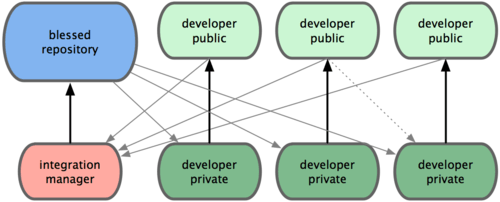
  • Flexible work flow: Git is extremely flexible. In Git, there is no "central" repository. Every Git repository is the same, and every repository can interact with each other in the same ways. Because of this loose coupling, there is a lot of flexibility in the collaboration of teams. An example here:
In this example the developers request the integration manager to pull each of their requests. The manager handles the merging, before pushing into the "central" repository. The integration manager interacts with the developer's repos the same way it interacts with the "central" repository.The point of all these being that you can manage any workflow independent of a central repository.


    2. Branching is Easier

I haven't really seen this problem when I used SVN, but I have been told by others- that people don't like making branches in SVN to the point that they just don't do it. This is bad. Committing to trunk is bad. After writing this I talked with a colleague who told me about continuous integration. Though I have heard this term before, I didn't associate that as a opposing force to "committing to the trunk is bad." So I'm retracting this statement, and I will do a future post about continuous integration. There is still the point that developers should be able to create branches easily for experimentation or whatnot. With Git, creating, switching to and deleting branches is easy, so developers won't think twice about creating an experimental branch, or one to start developing a new feature on.
  • People don't branch in SVN: There are few reasons why people don't like branching in SVN. One is you usually have to type in a long URL where the SVN repo is located... twice. Once for copying from and once for copying to. This operation takes a few seconds, as you are copying the entire branch over. When its all over, you have a directory on the SVN server that everybody can see with your name spelled wrong.
  • Branching in Git at two levels: 
    • The first level of branching in Git people don't really realize, that is "git clone". Whenever you clone a repo, you are copying the code base from one place to another, effectively creating a branch off the original code base. In fact, the command is similar in speed of execution and annoying-ness as creating a branch in SVN. The difference is that you are required to clone, there is no other option. This forces the workflow of separating a developer's workspace from the trunk. 
    • The second level of branching is with the "git branch" command. To create a branch in git you do. "git branch <branch_name>". This is very fast and lightweight command. More so, switching branches is just as easy, just do: "git checkout <branch_name>". This additional second level of branching not present in SVN give developers flexibility to separate their features, bugs and experiments at their discretion. The added complexity is managed by them, not the central server, and pushing changes to the server is selective to only the branches of their choosing.

    3. Faster and Smaller

I won't go too much into detail about this, and you can look into the specific implementations of Git and SVN to understand why Git is faster and smaller. But, its a good thing.


Thursday, August 15, 2013

An Introduction to LDAP

The Lightweight Directory Access Protocol is a protocol that sits in the application layer1. The protocol is used for accessing and maintaining internals of distributed directory services- which are covered by the x.500 standard series3.

LDAP derived from DAP, that used to run only on a deployed OSI2 network. As the TCP/IP network stack took over the internet, LDAP rose up as the TCP/IP alternate to DAP. The L ("lightweight") comes from the significant less bandwidth required for transactions.

To start a LDAP session, a client connects to a LDAP server (a Directory System Agent (DSA) in x.500 terms). Client will make requests to server, and server will respond to requests - all asynchronously. All information is sent using Basic Encoding Rules (BER)4. After initial connection the user must send a request to BIND, that will authenticate the user.

Directory Structure:
An example of an entry stored  in LDAP:

dn: cn=John Doe,dc=example,dc=com
cn: John Doe
givenName: John
sn: Doe
telephoneNumber: +1 888 555 6789
telephoneNumber: +1 888 555 1232
mail: john@example.com
manager: cn=Barbara Doe,dc=example,dc=com
objectClass: inetOrgPerson
objectClass: organizationalPerson
objectClass: person
objectClass: top

"dn" is the distinguish name that is a composite of cn "common name" and one or more dc's "domain component." cn translates to a file name in a file system, and the collection of dn's would be the file path. It works most specific first then up. So above would translate in linux to com/example/John Doe.

Every line above is an attribute, which has the following syntax:
<key>:<value>
A class in LDAP defines a set of attributes that an entry can define. Classes can inherit from other classes and so a subclass will inherit all of its parents attributes by definition. (Normal OO stuff). The objectClass attribute defines classes that this entry uses (that then define what attributes it can set). "top" is the abstract parent class of all other classes. (either directly or indirectly)

Operations:
The data for Operation requests sent by the client are in similar format to how entries are represented on the LDAP servers. For example, the following data is for an ADD operation:

dn: uid=user,ou=people,dc=example,dc=com
changetype: add
objectClass: top
objectClass: person
uid: user
sn: last-name
cn: common-name
userPassword: password
In the above example, uid=user,ou=people,dc=example,dc=com must not exist, and ou=people,dc=example,dc=com must exist.

The complete list for operations is as follows:
  • StartTLS — use the LDAPv3 Transport Layer Security (TLS) extension for a secure connection
  • Bind — authenticate and specify LDAP protocol version
  • Search — search for and/or retrieve directory entries
  • Compare — test if a named entry contains a given attribute value
  • Add a new entry
  • Delete an entry
  • Modify an entry
  • Modify Distinguished Name (DN) — move or rename an entry
  • Abandon — abort a previous request
  • Extended Operation — generic operation used to define other operations
  • Unbind — close the connection (not the inverse of Bind)
1Application Layer -> The TCP/IP networking layer that is above transport.
2OSI -> Open System Interconnection. Internet uses TCP/IP. There isn't too many actual implementations of OSI, but it is still used as a model for learning and debugging.
3Series of computer networking standards for directory services created by ITU-T(ITU Telecommunications Standardization Sector)
4AKA x.690 ->Format for encoding ASN.1 data structures.